ChronAlert is built around a simple idea: put the information you care about on a screen and leave it there. Instead of bouncing between weather sites, alert pages, propagation tools, radio apps and other dashboards, ChronAlert brings that information together into one live display.
It runs on a Windows or Linux PC and is designed to stay on in the shack, office, workshop or anywhere else a dedicated screen makes sense. Panels rotate automatically, the data keeps updating, and the same installation can be viewed from other devices on your local network.
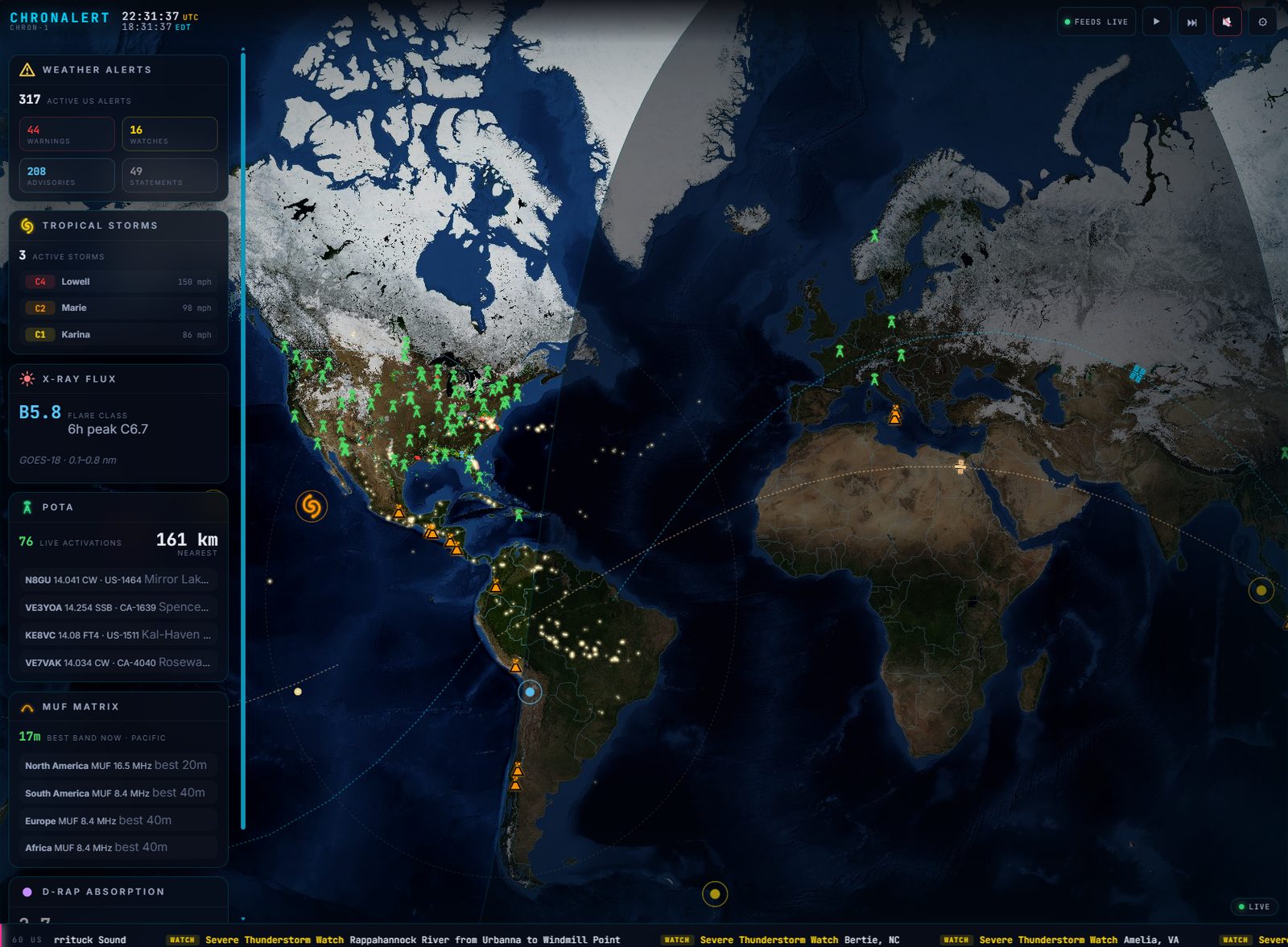 A World Panel in ChronAlert. The map, cards and overlays are all selected by the user, so this is one example rather than a fixed layout.
What Is ChronAlert?
ChronAlert is a PC-based live dashboard that combines public weather, emergency, radio, hazard and infrastructure data on customizable screens. It is local-first, runs on your own computer, and can serve the display to TVs, tablets, phones and other computers across your local network.
The free version costs nothing and requires no subscription. ChronAlert Pro is an optional one-time lifetime license that adds more Panels and Watch Zones, multi-screen control, automation, radio integrations and other advanced features.
See ChronAlert in Action
This short overview shows the basic idea without turning into a setup tutorial. It starts with a World Panel, moves through a U.S. view and a local view, then shows how another screen on the network can display something completely different.
Panels Are the Core of ChronAlert
A Panel is a saved view. It remembers the map scope, the map layers, and the cards shown on the left side of the screen. Build a few Panels around different purposes and ChronAlert can rotate through them automatically.
For example, a World Panel might watch tropical systems, earthquakes, volcanoes and DXpeditions. A National Panel might focus on weather radar, alerts, POTA activity or propagation. A Local Panel can move closer to home for APRS, nearby aircraft, Meshtastic, MeshCore or whatever else belongs in that view.
The point is not to cram every feed onto one screen. It is to group the information that belongs together, save those combinations, and let ChronAlert keep them visible.
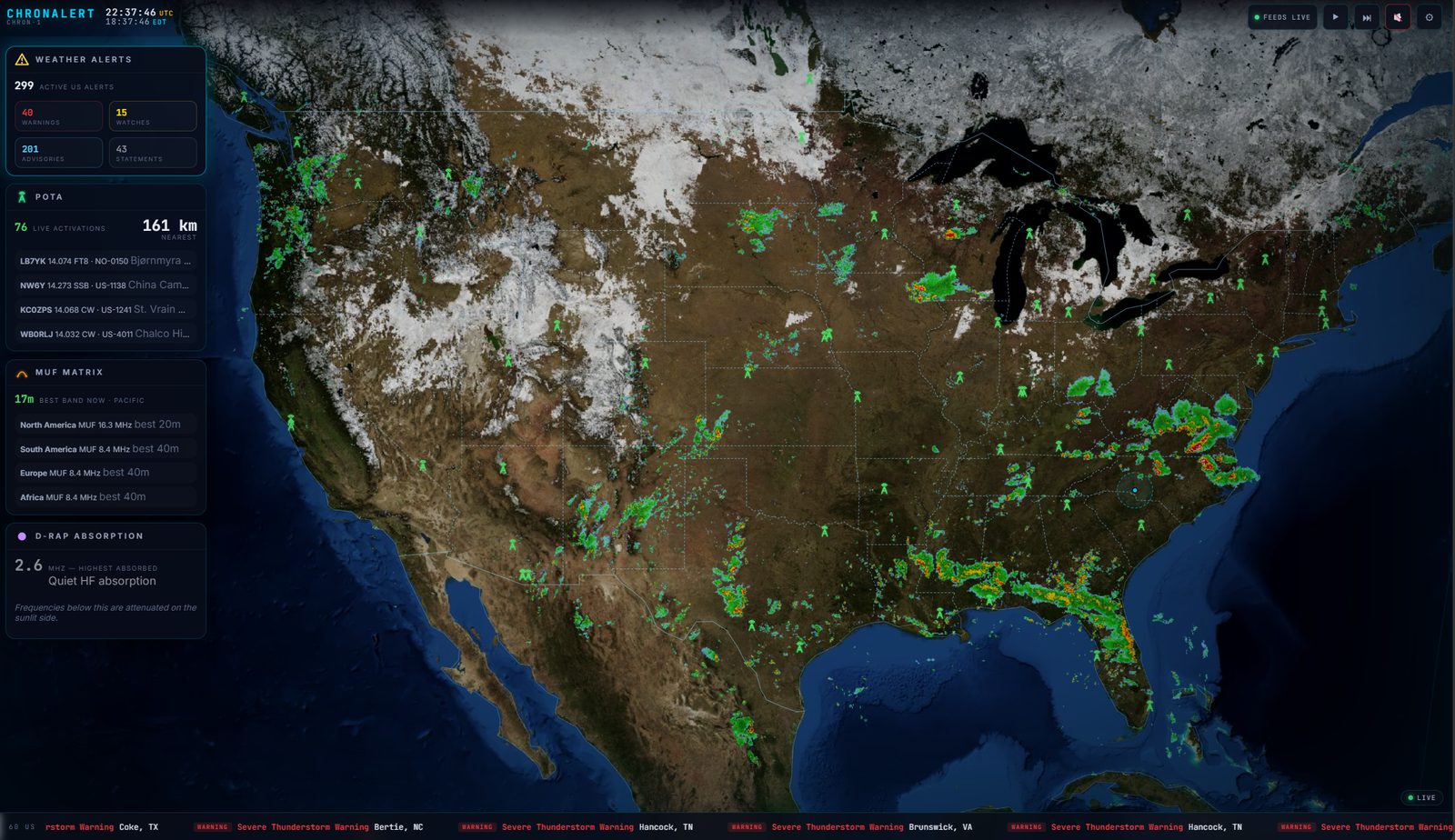 A National Panel can use a completely different mix of maps, overlays and cards from the World Panel.
From World View to What Is Happening Around You
Every Panel uses one of four geographic views: World, National, Regional or Local. Regional and Local views are centered around the location you set, while National follows the supported country selected during setup.
WorldGlobal weather, hazards, tropical systems, satellites, propagation and radio activity.
NationalCountry-wide weather, radar, alerts and other feeds that make sense at national scale.
RegionalA configurable radius around your location for weather and activity moving toward your area.
LocalA tighter view around home for nearby activity, radio networks, aircraft and local conditions.
What Can ChronAlert Show?
ChronAlert currently includes 48 live feeds and overlays. The range is what makes it useful: weather and emergency information can sit beside ham radio activity, space weather, natural hazards and local radio-network data without needing a pile of separate browser tabs.
Weather & Emergency
Official weather alerts, radar, lightning, tropical storms, METAR observations, FEMA IPAWS/EAS alerts, global disaster alerts and other live weather layers.
Ham Radio & Propagation
PSK Reporter, POTA, WWFF, WWBOTA, NCDXF beacons, AMSAT passes, MUF, D-RAP, DXpeditions and more.
Hazards & Infrastructure
Earthquakes, volcanoes and space weather are available in the core dashboard. Pro also adds U.S. RadNet radiation monitoring, electric-grid data, nuclear-reactor status, wildfires and CDC respiratory-illness activity.
Local Radio & Tracking
Pro can add APRS-IS, APRS RF, Meshtastic, MeshCore, ADS-B aircraft and AIS vessel data using internet feeds or your own local radio hardware where applicable.
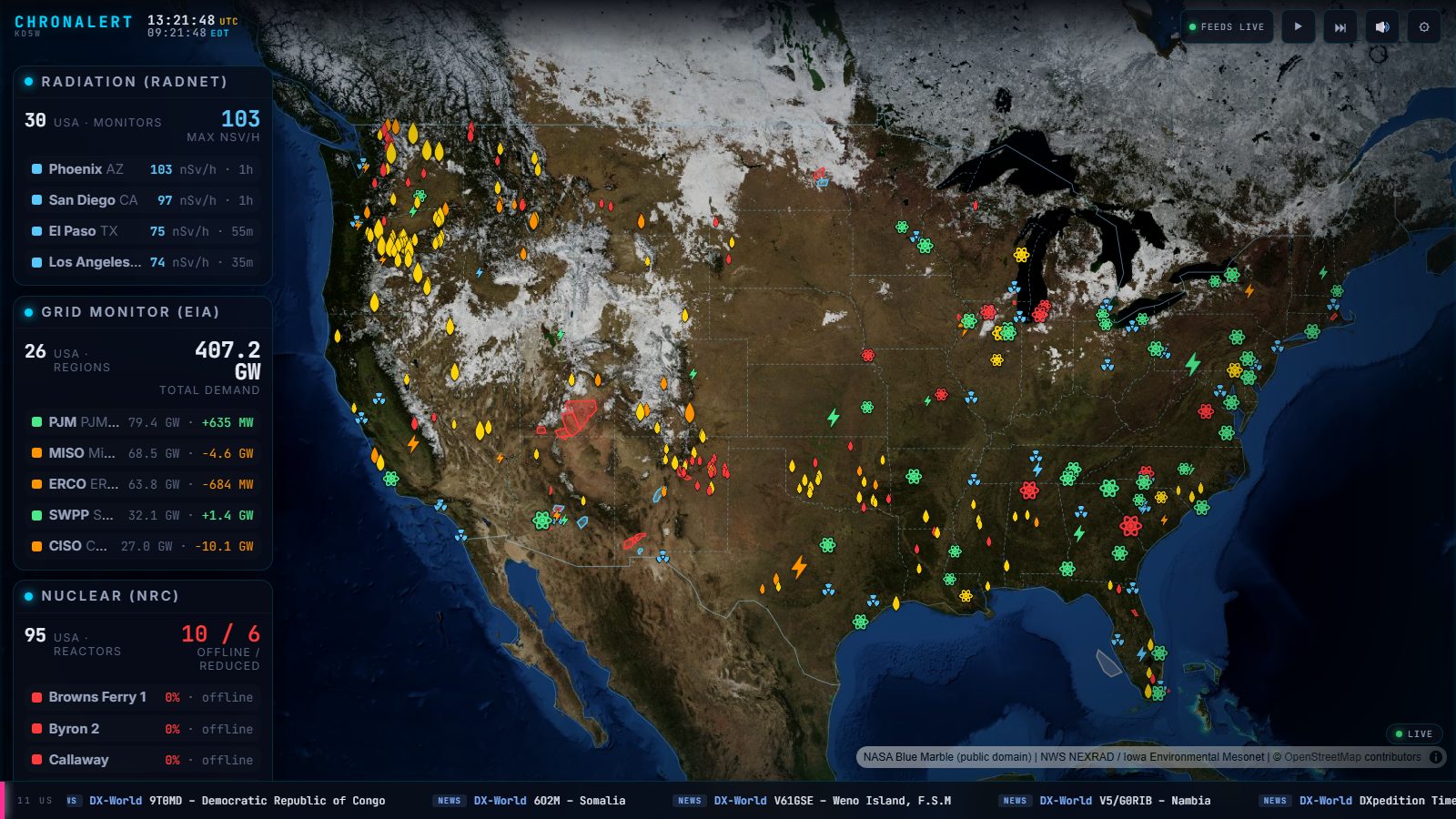 ChronAlert Pro can combine public infrastructure and hazard feeds such as EPA RadNet, EIA grid data, NRC reactor status and NIFC wildfire information on one U.S. view.
One PC, Multiple Screens
ChronAlert runs a local web server, so the computer running the software does not have to be the only display. Other devices on the same network can open ChronAlert in a browser.
That means the host PC can stay in the shack or office while a TV, tablet, another computer or other browser-capable device shows the dashboard somewhere else. ChronAlert Pro can take that farther by giving different screens their own Panel rotations, so the TV can show weather while the shack monitor shows ham radio and propagation information.
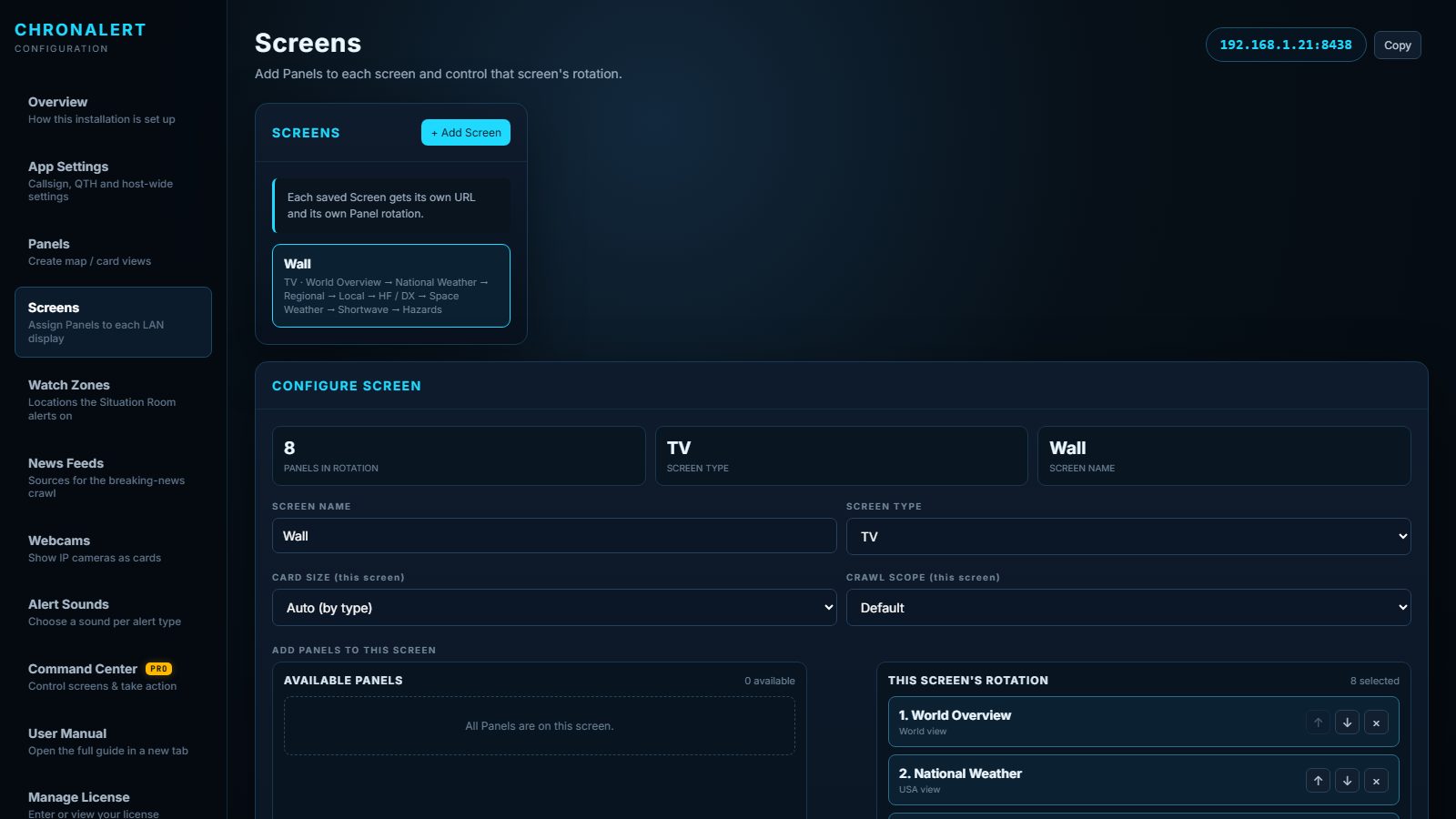 ChronAlert Pro Screens let each physical display have its own Panel rotation and its own URL on the local network.
Feed Health: Know Whether the Data Is Current
Live information is only useful when you know it is actually live. ChronAlert grades critical feeds as LIVE, STALE or OFFLINE instead of quietly leaving old information on screen when a source stops updating.
ChronAlert Pro: When the Dashboard Can React
ChronAlert Free is designed to be useful on its own. Pro adds the features that make the system more active and more personal.
The Situation Room can interrupt the normal Panel rotation when a qualifying critical event reaches one of your Watch Zones, move the map to the event, force on relevant layers, show the event in context, and return to the normal rotation when the incident clears.
Pro also adds Command Center, different content on different screens, more Panels and Watch Zones, APRS, Meshtastic and MeshCore integration, QSO mapping, Shortwave On Now, local ADS-B and AIS support, infrastructure feeds and other advanced tools.
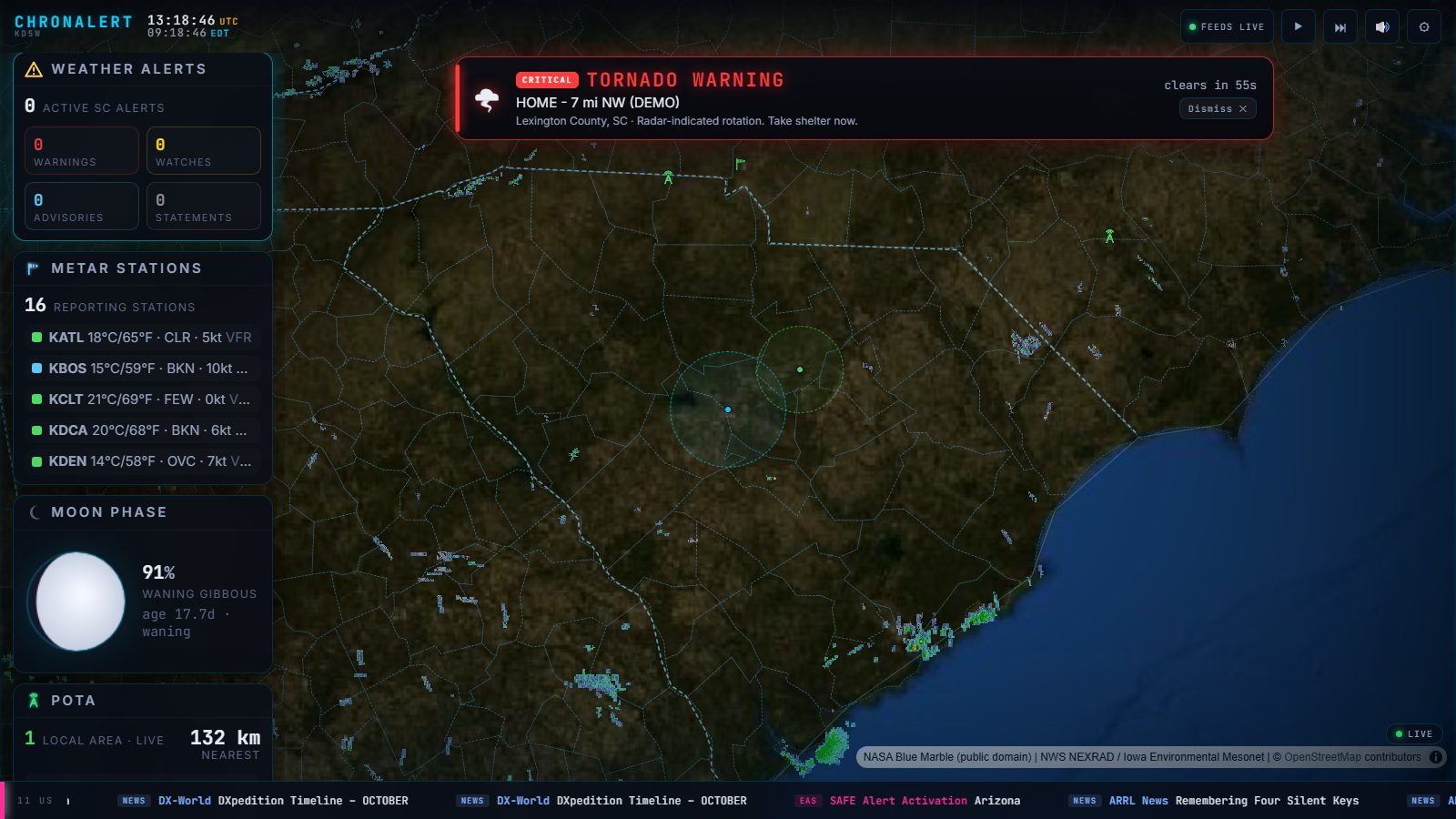 Situation Room can temporarily take over a display when a configured critical event reaches a Watch Zone, then return to normal afterward.
Ham Radio Is Built Into the Same Dashboard
ChronAlert is not a weather dashboard with one radio widget bolted onto the side. Ham radio data is part of the same Panel system as weather and emergency information.
You can build a Panel around POTA, WWFF, NCDXF beacons, DXpeditions, PSK Reporter, MUF conditions and D-RAP, then let another Panel handle severe weather or local awareness. Pro can add logger-driven QSO mapping, Meshtastic, MeshCore and APRS.
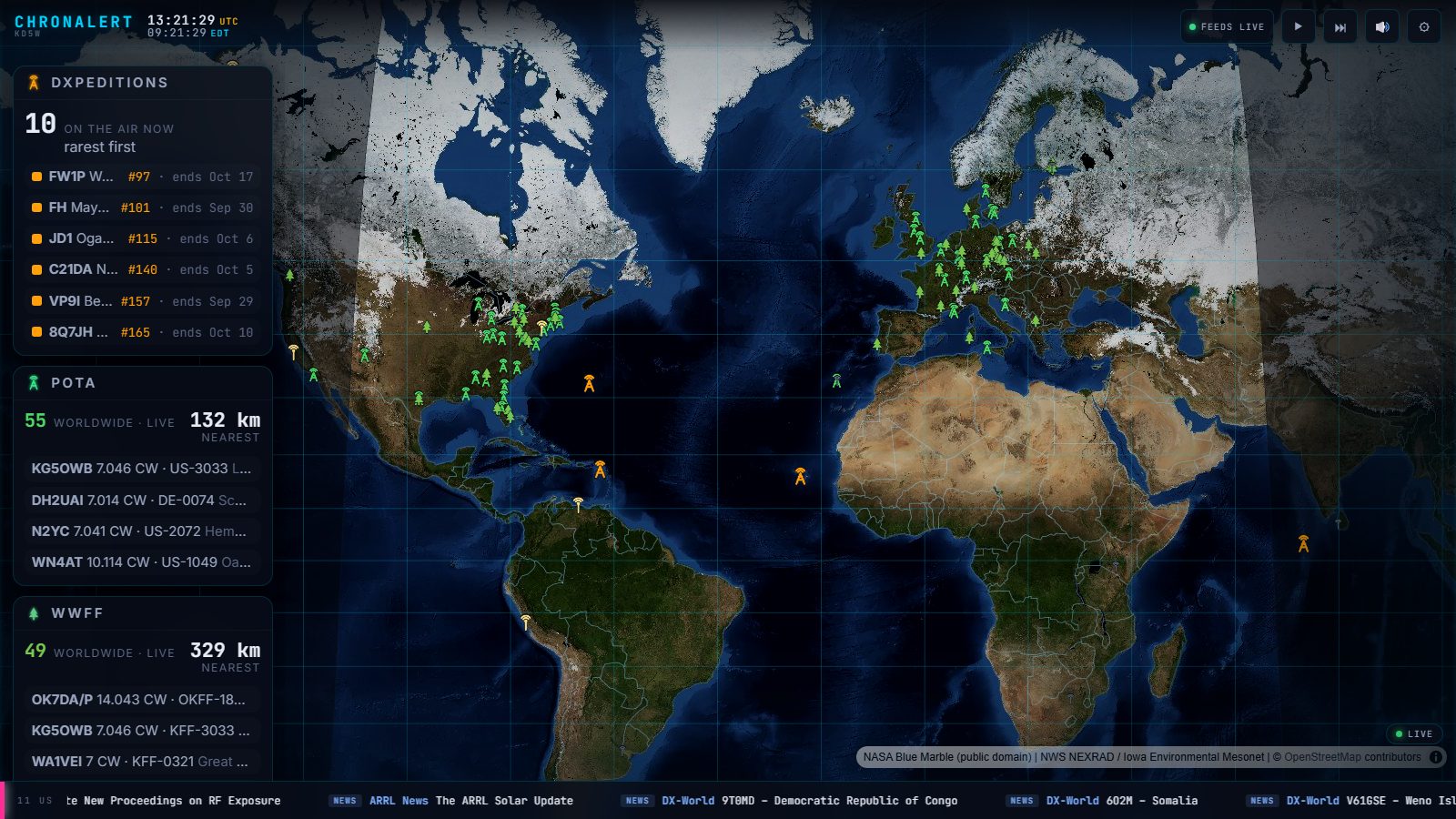 A ham-radio focused Panel can watch activators, DXpeditions and propagation while other Panels handle weather, alerts or local activity.
Free vs. ChronAlert Pro
The free version is not a timed demo. It has no expiration and no subscription. Pro is an optional one-time lifetime license for users who want more capacity, automation and integrations.
| Feature | ChronAlert Free | ChronAlert Pro |
|---|
| Core live feeds, maps and alerts | Yes | Yes |
| World / National / Regional / Local views | Yes | Yes |
| Feed Health | Yes | Yes |
| LAN viewing | Yes | Yes |
| Saved Panels | 2 | 10 |
| Watch Zones | 1 | 10 |
| Automatic Situation Room takeover | No | Yes |
| Different content on different screens | No | Yes |
| Command Center | No | Yes |
| APRS / Meshtastic / MeshCore integrations | No | Yes |
| Hazards & infrastructure Pro feeds | No | Yes |
| Price | $0 | $39.99 one-time lifetime license |
Local-First, but Still Connected to Live Data
ChronAlert runs on your own PC and does not require a ChronAlert cloud account for the free version. Public feeds come directly to your computer from their providers, and your Panels can be viewed around your own local network.
That does not mean the live data works without internet access. Weather, emergency, radio and other public feeds still depend on the source providers being reachable. ChronAlert's Feed Health system is there so you can see when a critical source is stale or offline.
Frequently Asked Questions
What is ChronAlert?
ChronAlert is a PC-based live situational-awareness dashboard that combines weather, emergency alerts, ham radio activity, natural hazards, infrastructure data and other live information on customizable displays.
Is ChronAlert free?
Yes. ChronAlert Free costs $0, requires no account, has no expiration and includes the core live feeds, four map views, two saved Panels, one Watch Zone, Feed Health and LAN viewing.
Does ChronAlert require a subscription?
No. ChronAlert Free has no subscription. ChronAlert Pro is an optional $39.99 one-time lifetime license.
What does ChronAlert run on?
ChronAlert runs on Windows and Linux x86-64 PCs. One host can serve the dashboard to other browser-capable devices on the same local network.
Can different screens show different information?
Yes. ChronAlert Pro can assign different Panel rotations to different physical displays across the local network.
Can ChronAlert show Meshtastic, MeshCore and APRS?
Yes, with ChronAlert Pro. ChronAlert supports Meshtastic and MeshCore radios over USB, APRS-IS, APRS RF through supported local radio hardware, and APRS messaging through Command Center.
Does ChronAlert replace official emergency warnings?
No. ChronAlert is a situational-awareness aid. Critical weather and emergency information should still be confirmed through official weather services, emergency-management agencies and local authorities.
Try ChronAlert
If you already have a spare monitor, TV or second screen sitting around, ChronAlert gives it a job. Start with the free version, build a couple of Panels around the information you care about, and let it run.
ChronAlert is built to stay visible. Instead of remembering which site or app has the information you want, you decide what belongs on the screen and let the dashboard keep it in front of you.