What if you could set a motion sensor somewhere on your property and receive an alert on your phone through your Meshtastic network, without running that sensor through a traditional Wi-Fi automation system? That is exactly what I wanted to demonstrate with the Heltec WiFi LoRa 32 Expansion Kit. Rather than spend the whole video talking about what might be possible with the GPIO pins, I connected a PIR motion sensor, configured Meshtastic, and showed the alerts actually arriving.
The idea is straightforward. A passive infrared sensor detects motion and changes its output. Meshtastic watches a GPIO pin for that change and sends an alert across the mesh. Another device on the same channel receives the notification. It is a simple example, but it opens the door to experimenting with other types of contact and detection sensors.
OpenELAB sent me the expansion kit to experiment with. In the video, I first wire and configure the sensor, then take the kit apart to see how the carrier board, battery, antenna connection, and Heltec V4 fit together. The result is a working motion detector and a better understanding of where this enclosure makes sense and where it does not.
Watch the Motion Sensor Demonstration
The video walks through the physical pin connections, Meshtastic settings, working phone notifications, and the complete enclosure teardown. Video timestamps: 0:00 introduction; 1:05 parts; 1:33 PIR wiring; 2:18 connecting to the expansion kit; 3:10 Detection Sensor configuration; 4:36 alert demonstration; 5:23 teardown; 7:53 final thoughts.
What Is the Heltec WiFi LoRa 32 Expansion Kit?
 Heltec WiFi LoRa 32 Expansion Kit, showing the assembled enclosure, connectors, and accessible expansion header. Image: OpenELAB.
At the heart of this setup is the Heltec WiFi LoRa 32 V4, a small LoRa development board that can run Meshtastic firmware. The expansion kit adds a carrier board and an enclosure that make its connections easier to get to. Instead of dealing with the development board's small pins directly every time you want to experiment, you have an accessible header on the assembled kit. That convenience is the real reason I wanted to test it.
There are multiple configurations of the kit. My version has a tempered-glass front. Heltec also offers touchscreen and optional GNSS configurations, and an 18650 battery can be included depending on the version you purchase. Those are choices to check on the product page rather than assume every kit contains them. The board and carrier hardware are packaged as one unit, with an SMA antenna connection and battery compartment.
Heltec describes the housing as a modular expansion platform for its WiFi LoRa 32 family. In practice, it is most appealing to someone who wants to try different sensors, validate a circuit, and experiment with firmware without immediately designing a custom enclosure. The important drawback is that this is not an all-weather node. The enclosure is relatively bulky for what it does, and Heltec explicitly states it is not waterproof.
That does not make it a bad product. It just defines the job it is suited for. It is an accessible test platform that makes the first stages of a sensor project easier. If you eventually want to leave a motion detector outside through rain, heat, and humidity, you would need a different enclosure and a deliberate weatherproof design.
Parts Needed for Meshtastic Motion Alerts
You do not need a complex electronics workbench for the demonstration. The entire experiment uses the expansion kit, a PIR sensor with a digital output, and jumper wires to make the three required connections.
- Heltec WiFi LoRa 32 V4 Expansion Kit: provides the Meshtastic node, carrier board, and accessible GPIO header.
- PIR motion sensor: produces an output when it detects a change in infrared radiation within its field of view.
- Three jumper connections: power, ground, and the sensor's output signal. I used male-to-female jumper leads to match the connectors.
- A computer and USB cable: for connecting to the node and setting up Meshtastic.
- A second Meshtastic device or phone connected to a receiving node: so you can see alerts arrive across the network.
For reference, the kit I used is sold through OpenELAB. The official Heltec product page has configuration and compatibility details, and the PIR sensor I demonstrated is linked here as well.
I have used this style of PIR sensor with Home Assistant for years, so it was a familiar component to experiment with. What changes in this build is what receives the sensor's output: a Meshtastic device instead of a conventional home automation input. The motion sensor itself does not know or care what radio network is involved.
Understanding the PIR Sensor Before Wiring It
The PIR sensor in the video has three connections: power, output, and ground. One complication with this particular module is that the pins are not clearly labeled. I explained their orientation in the video, but this is a detail to check carefully before applying power. A sensor that looks similar from the front is not necessarily wired the same way on the back.
For the sensor used in this demonstration, with the pins oriented toward me as shown on camera, I identified the left connection as 5V power, the center as the signal output, and the right connection as ground. I used red wire for power, orange for the signal, and brown for ground. Color coding is not electrically required, but it makes the connections easier to follow when troubleshooting.
Red — Power
Connect the demonstrated PIR module's 5V power input to the expansion kit's 5V pin.
Orange — Signal
Connect the sensor's middle output pin to the header pin assigned to GPIO 48 in Meshtastic.
Brown — Ground
Connect the sensor ground to the expansion kit's ground header pin so both devices share the same reference.
There are also adjustments on the sensor. I placed the jumper in the high-trigger position shown in the video, turned one adjustment down, and used the other to adjust sensitivity. These controls affect how the PIR behaves independently of the Meshtastic configuration. The physical sensor can influence how often its output changes, while Meshtastic adds its own rules about when to send a message.
Important: these pin positions apply to the specific PIR module and board arrangement demonstrated. Confirm the markings or documentation for any substitute sensor, and confirm its output voltage is safe for the Heltec's 3.3V GPIO input. Supplying a module with 5V does not automatically mean its output is safe to connect directly to a 3.3V input. I did not measure or establish a universal output-voltage specification for every PIR module in this video.
Connecting the PIR to the Expansion Kit
This is where the expansion kit earns its keep. The carrier board exposes the connection points instead of requiring a separate breadboard or a collection of temporary connections to the bare Heltec board. With the unit positioned as in the video, I located the 5V connection at the upper left of the header. The ground pin was immediately below it, and GPIO 48 was immediately below ground.
I plugged the power, ground, and signal jumper leads into those three positions, checking that the signal lead was on the same pin I intended to configure in Meshtastic. After that, there was no extra circuitry to assemble for the demonstration. The physical wiring was complete with only three leads.
That is a good example of why a breakout or expansion board can be useful even when you could technically do the same thing with a bare microcontroller. It reduces the amount of setup between an idea and a functioning test. I could move the sensor around, observe the notifications, and change settings without first building a finished sensor housing.
Of course, loose jumper leads are not a permanent mounting solution. If this were going to be installed somewhere rather than used as a bench prototype, I would want secure connections, strain relief, a proper sensor opening, and a case designed for the intended environment. None of that is necessary to prove that Meshtastic can recognize a PIR trigger and send an alert, which was the goal of this experiment.
Configure the Meshtastic Detection Sensor Module
With the wiring in place, I connected the Heltec to the computer. Before experimenting, I recommend checking that the firmware is appropriate for your exact board revision. Heltec's current expansion-kit documentation distinguishes normal V4 configurations from touchscreen configurations, so the correct firmware target matters.
In Meshtastic, navigate to Settings → Module Configuration → Detection Sensor. The module monitors the selected GPIO input and generates a message when its configured trigger condition is met. For the working build in the video, I entered the following values:
Enabled: On
Turn on the Detection Sensor module so Meshtastic monitors the input.
Minimum interval: 30 seconds
I chose 30 seconds to reduce repeated alerts. In this test, another message would not be generated immediately after one was sent.
Friendly name: Motion
This makes the message easier to recognize than an anonymous detection event.
GPIO pin: 48
The module watches the same GPIO 48 header connection used for the orange PIR output wire.
Trigger type: Rising Edge
The alert is based on the signal changing from low to high, matching the trigger behavior used in this demonstration.
After setting those fields, I saved the configuration. There is no custom program or external automation server in this example. Meshtastic already includes the detection feature; the work is matching its configuration to the sensor's electrical output and using a receiving device that can see the channel.
One distinction worth making: the 30-second interval is not the PIR sensor's detection range, sensitivity, or a guarantee about how long its output stays active. It is a Meshtastic messaging setting. If you alter the sensor's own timer or trigger jumper, you can change the behavior before the signal ever reaches the GPIO pin.
Keep Motion Notifications off the Public Channel
There is a channel behavior in this setup that I want to call out because it matters more than the three-wire hookup. During the demonstration, the Detection Sensor messages were sent on the primary Meshtastic channel. If your primary channel is the usual public channel, that is where those messages will go. I did not want the motion events from my test sensor being transmitted as public-channel traffic.
My solution was to configure the sensor node's primary channel as a separate private channel. I named mine Motion and set a channel key. Then I shared that channel configuration with the other devices I wanted to receive the notifications. Once the receiving device had the corresponding channel name and key, the alerts appeared there.
This is slightly different from simply adding a private secondary channel to an otherwise public setup. For the behavior shown here, the event is being generated on the node's primary channel. Changing only a secondary channel would not accomplish the same thing. That is why I changed the primary channel on this dedicated sensor node.
The tradeoff is that the node is now dedicated to that channel arrangement instead of acting like an ordinary public-channel communications device. For this project, that was fine. I was not using the motion-sensor box as my general-purpose messaging radio. It existed to monitor an input and report it to a few receiving nodes.
A private, keyed channel also provides a more appropriate home for repetitive sensor information. It is still radio traffic, and the system is not a substitute for a professionally monitored security alarm. But it avoids unnecessarily putting your test notifications into a general chat channel and makes it easier to recognize which device is responsible for each message.
Testing the Alerts: The Startup Delay That Fooled Me
Once everything was configured, I triggered the motion sensor and checked the phone connected to my receiving Meshtastic device. The notifications came through, and I could see the earlier motion events from my tests. That was the proof I wanted: a physical movement in front of a PIR module translated into a text notification over the mesh.
There was one part of testing that caused unnecessary confusion. After a reboot, the device did not seem to detect motion immediately. I spent time wondering whether something was wrong with my wiring or settings, but it turned out I needed to give the system a little time before testing again.
In the video, I found that it took roughly one minute to a minute and a half after restarting before I could reliably trigger the motion messages. Once I waited, the sensor worked and the phone displayed the alert. That observation is specific to this build and firmware behavior; I am not claiming every possible Meshtastic device has the same fixed startup delay.
If you reproduce this project and nothing appears right after a restart, resist the urge to immediately change several settings at once. Let the device finish starting and the PIR settle, then try again. Otherwise, you can end up troubleshooting a configuration that was already correct. That was the most useful practical lesson from the testing portion of this project.
When the notifications were arriving, the setup behaved exactly as intended. The sensor was not trying to detect a person by name or classify what was moving. It only registered the PIR event and reported it. That simplicity is a strength for experimenting with Meshtastic's GPIO detection feature.
Heltec Expansion Kit Teardown: What's Inside?
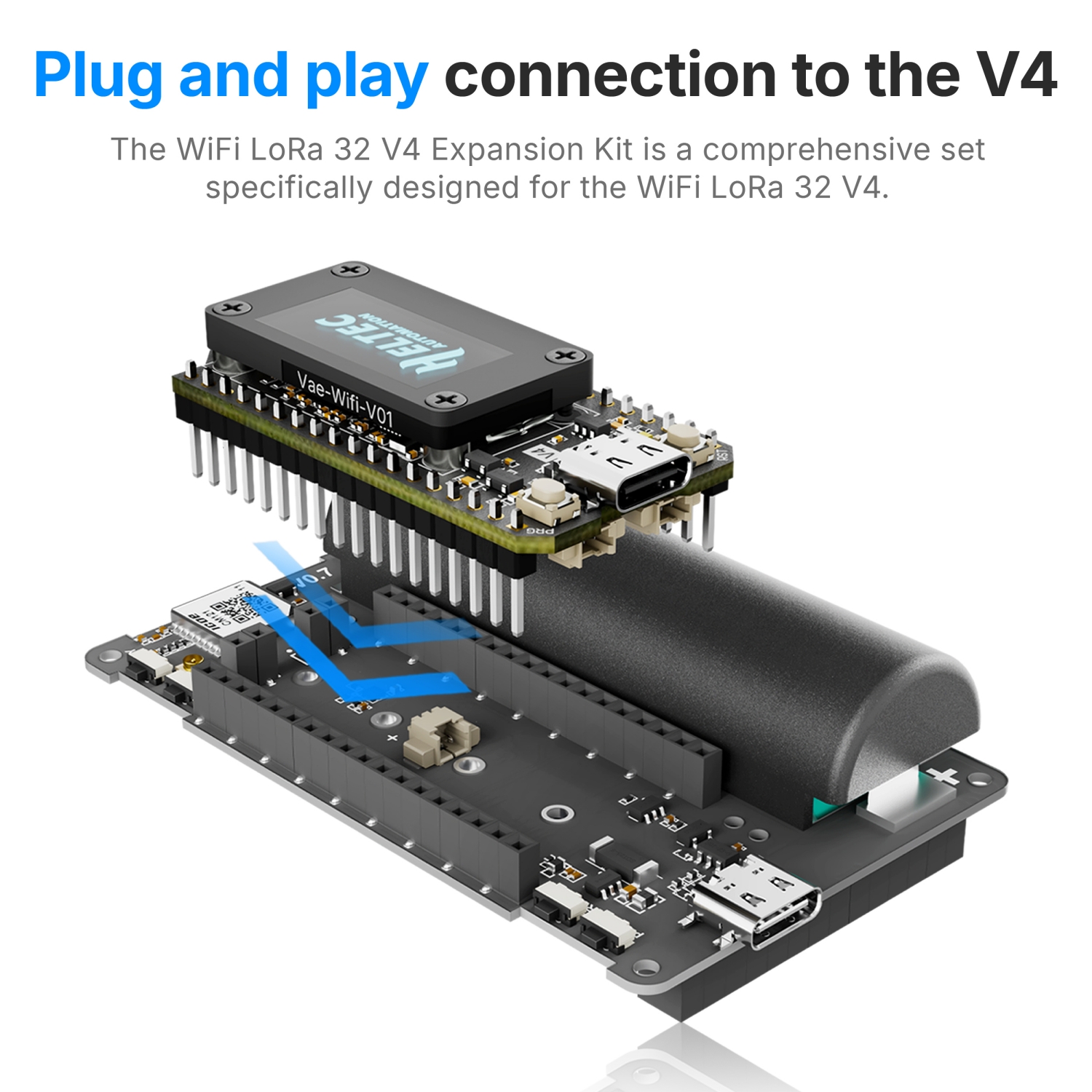 The Heltec V4 plugs into an expansion carrier board with an 18650 battery holder. Product illustration sourced from a retailer listing.
With the motion alerts working, I moved on to the teardown. There are four screws in the rear panel. Once they are removed, the back comes off and exposes the internal hardware. My first impression of the rear panel was not great. The plastic felt cheap compared with what I would want on something that gets handled in the field, although that matters less on a bench prototype.
Inside, I could see additional M1.0 expansion connectors for accessories. Four brass retaining nuts had to come out before I could remove the carrier board. I also unscrewed the antenna connection and lifted the assembly out. That exposed the battery bay, the SMA pigtail, and the way the V4 board connects to the expansion hardware.
There was indeed an 18650 battery in my unit. It sits inside the enclosure, but getting it into position revealed one of the most frustrating design decisions. The battery had to be inserted from the side that was blocked by the installed board. I could not just slide it into place through the accessible opening. Because the front glass did not appear to come off easily, I had to remove the board to install the battery.
Reassembly brought another problem: the tiny plastic buttons started falling out of position as soon as the assembly was apart. They needed to remain lined up with their corresponding switches while the board went back into the enclosure. I found myself tilting the case to keep them in place, which turned a straightforward battery installation into an irritating little puzzle.
The lesson here is not that the board is unusable. It is that I would avoid repeatedly disassembling the case unless necessary. The removable carrier board is helpful to inspect or modify, but the battery-access and button-retention details do not invite frequent servicing.
Battery Power, Antenna Pigtail, and the Carrier Board
With the assembly removed, the internal layout became easier to understand. The enclosure routes the antenna connector through an SMA pigtail. It was longer than I expected, leaving a noticeable amount of cable inside the case. The carrier board also has battery polarity markings, which I was happy to see because there is no reason to make basic power wiring ambiguous.
I then carefully separated the Heltec V4 from its expansion board. This revealed the small jumper and power circuitry between the two boards. During the teardown I pointed out a small voltage regulator on the expansion hardware. The overall design uses the battery bay and carrier-board power arrangement to feed the installed Heltec unit, rather than just placing an 18650 next to an entirely independent board.
One caution when interpreting an on-camera teardown: a brief look at the regulator and wiring does not establish every voltage present on every connection. For modifications or a different sensor, the board schematic and pin map are the right references. My successful PIR hookup demonstrates one working configuration, not permission to treat every exposed pin as a 5V-tolerant input.
Seeing the inside reinforced my original impression. The kit has useful functionality in a relatively convenient package, especially if you need access to GPIO while experimenting. But the enclosure construction, awkward battery installation, and loose buttons are compromises. It is not the type of protective housing I would choose for a permanent outdoor installation.
What Other Sensors Could You Try?
The PIR motion sensor is only one example of a digital detection input. The same general concept can apply to a switch or sensor that presents a compatible signal to a GPIO pin. A magnetic contact switch on a door, a simple open/closed contact, or another motion detector could provide a different event to report, provided the electrical interface and module configuration are correct.
That distinction matters. Meshtastic's Detection Sensor module is not a universal analog measurement dashboard. A temperature sensor with a complex digital protocol, for example, does not become compatible just because it has wires. The most natural substitutions are inputs that clearly change state and can be safely matched to the logic levels the Heltec expects.
For a door contact you might want a trigger on a different edge or a properly configured pull-up circuit, depending on how it is wired. For a beam-break detector you would look at the polarity of its output. The goal is always the same: make sure the signal transition Meshtastic is watching actually corresponds to the physical event you care about.
That is the part of the experiment I find most interesting. Once you verify the mechanics of receiving an event over the mesh, you can begin designing around a real use case instead of guessing about whether the radio side will work. Just be thoughtful about duty cycle, how often notifications are sent, and what should happen if an event occurs when no receiving node is available.
Meshtastic Versus MeshCore for This Project
Both Meshtastic and MeshCore are used with LoRa hardware, and the Heltec V4 family is relevant to both ecosystems. But firmware capability is part of the project, not a detail you can ignore. This demonstration specifically uses the Meshtastic Detection Sensor module, which is what makes the GPIO-triggered alert practical without writing a separate application.
At the time of this video, I did not have an equivalent built-in motion-sensor workflow to demonstrate in MeshCore. I would like to see that functionality develop, because the same basic hardware could serve useful projects on either network. That is a wish for future capability, not a claim that this Meshtastic configuration can be copied directly into MeshCore.
If you are following the tutorial, stick with the Meshtastic firmware and the board target appropriate to your hardware. The fact that a platform can boot on a Heltec V4 does not guarantee it exposes the same detection settings, uses the same GPIO initialization, or sends alerts in the same way.
Frequently Asked Questions
Can Meshtastic send motion alerts?
Yes. Its Detection Sensor module can monitor a GPIO input and generate a message when the configured event occurs. In this build a PIR sensor produced the rising-edge signal that generated motion alerts over the network.
What GPIO pin was used on the Heltec V4 Expansion Kit?
I used GPIO 48 for the PIR signal. In the orientation shown during the video, it was directly below the ground connection on the accessible expansion header, with 5V above ground.
Will the alert go to a private channel?
In the firmware used for this demonstration, the message went to the primary channel. I configured a private, keyed primary channel called Motion on the sensor node and shared that channel with my receiving nodes.
Why am I not getting alerts right after restarting?
In my test I had to wait roughly 60 to 90 seconds after reboot before the sensor reliably triggered messages. Wait for startup to settle before assuming the wiring or module settings are wrong.
Is the Expansion Kit waterproof?
No. Heltec says the kit is not waterproof. I consider it a convenient prototyping platform, not a weatherproof outdoor sensor enclosure.
Can I do this exact project with MeshCore?
The tutorial uses Meshtastic's built-in Detection Sensor feature. I did not demonstrate the same built-in sensor-alert workflow with MeshCore.
Final Thoughts: A Good Prototype, Not a Field Enclosure
The motion sensor experiment worked. Three connections to the expansion kit, a few values in Meshtastic's Detection Sensor settings, and I had alerts arriving on another device. The most important configuration choices were GPIO 48, rising-edge detection, a 30-second minimum interval, and moving the primary channel away from public traffic. The unexpected part was remembering to wait after reboot before testing again.
The Heltec WiFi LoRa 32 Expansion Kit did what I wanted it to do: give me a quick way to prototype a sensor without building a finished electronics project first. It is easy to access the GPIO pins, and there is room to explore other sensor ideas. For that purpose, I see the value.
My opinion of the enclosure itself is less enthusiastic. It is bulky, it is not waterproof, the back panel does not feel especially sturdy, and installing the battery required more disassembly than it should have. The loose buttons during reassembly were a particular nuisance. Those drawbacks would bother me more if this were sold as something to leave outdoors in service for months, but for bench experimentation they are manageable.
The most interesting takeaway is not the box. It is that Meshtastic already has the pieces to turn a simple sensor event into a network notification. What would you connect next: a gate contact, a door sensor, a beam detector, or something else? Let me know what you would try.
Check Out the Heltec Expansion Kit
See the version options and availability from OpenELAB, and compare them with the official Heltec hardware documentation before ordering.
View the Heltec Expansion Kit at OpenELAB