TL;DR — How WSPR maps your signal
- Core idea: WSPR sends short, low power digital beacons that nearby and distant stations decode and report online.
- Why it matters: Those reports draw a real propagation map of where your antenna and band are actually being heard.
- Key benefit: You can compare antennas, power levels, and bands without scheduling skeds or logging a single QSO.
- Who it's for: HF operators, QRP fans, antenna experimenters, and anyone trying to understand day-to-day propagation.
Every ham has wondered where their signal really goes once it leaves the antenna. WSPR, short for "Weak Signal Propagation Reporter," answers that question using tiny, low power beacons and a worldwide network of listeners. It turns your normal HF rig into a propagation test tool so you can see, in hard data, how far your station reaches on different bands, at different times of day, and with different antennas.
On the air, a WSPR transmission looks like a whisper. Most stations run a watt or two, it takes up a tiny slice of spectrum, and it stays on the air for just under two minutes. Inside that signal is your callsign, grid square, and transmit power in dBm. Thanks to heavy error correction and very narrow decoding, stations regularly copy WSPR signals that sit 20 to 30 dB below the noise floor.
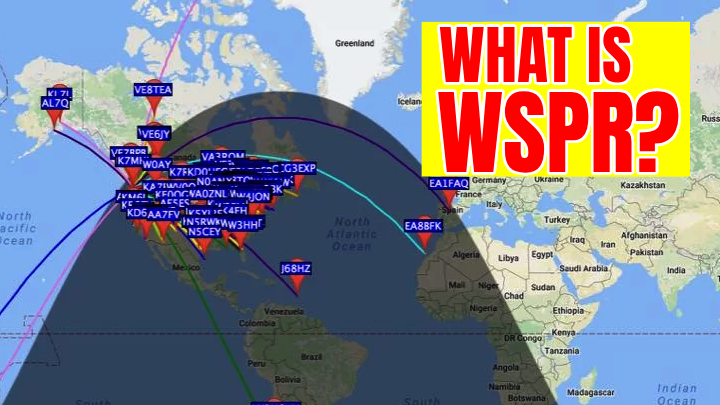
Every time you transmit, any WSPR capable receiver that decodes you uploads a spot to a central database like WSPRnet. After a few cycles, dots start appearing on a map showing where you were heard, the signal to noise ratio, and the time. Let it run for an hour and you’ve built a propagation picture that would have taken days of casual QSOs to piece together.
What exactly is WSPR doing on the air?
WSPR is part of the WSJT-X family of digital modes. Like FT8, it trades speed for extreme weak signal performance. A single WSPR message is 162 symbols long and takes 110.6 seconds to send, with all stations transmitting on even UTC minutes so decoding stays synchronized. The payload is tiny, just your callsign, four character Maidenhead grid, and transmit power. That’s it. No back and forth, no macros, just a steady beacon doing its job.
Key WSPR numbers at a glance
| Metric |
Value |
Why It Matters |
| Typical WSPR transmit power |
0.1 to 5 watts |
Shows how far QRP levels really carry without hiding problems by cranking up the power. |
| Transmission cycle length |
110.6 seconds, every 2 minutes |
Synchronized cycles let you compare spots between stations and over time with consistent timing. |
How WSPR turns your rig into a propagation probe
You don’t need a special radio to run WSPR. Most hams use WSJT-X on a computer hooked up to the same HF rig they already use for FT8 or PSK. Set your callsign and grid, pick the WSPR mode, make sure your computer clock is synced, choose the correct WSPR frequency for your band plan, and you’re ready. Once it’s running, the software quietly beacons every couple of minutes while logging both your transmissions and anything you decode from other stations.
Getting started is straightforward. Install WSJT-X and enter your station details, then set your radio to a low, safe power level and confirm your antenna and SWR look sane. Let the station beacon for 15 to 30 minutes on a single band without touching anything. After that, head over to sites like WSPRnet to see where your signal showed up, then repeat the test with another band, antenna, or power level.
How WSPR compares to normal on-air activity
It’s easy to lump WSPR in with other digital modes, but it behaves very differently from something like FT8. There’s no exchange and no signal report coming back from another operator. Instead, you get a statistical picture of where contacts are possible if you switched to a conversational mode. WSPR feels less like operating and more like turning on a test instrument, which is exactly why it pairs so well with regular HF operating.
Compared to FT8, WSPR is slow but far more sensitive. You give up quick QSOs in exchange for seeing paths that are barely holding together, especially at night or on the low bands. Compared to traditional beacons, WSPR is flexible. Any station can beacon on multiple bands without dedicated hardware, and all the reports roll into shared online maps. And compared to calling CQ, WSPR removes the human factor entirely. You see where your signal goes even when nobody is spinning the dial.
Understanding your station’s performance from WSPR maps
Once you start digging into WSPR spots, patterns show up fast. On 40 meters you might see solid regional coverage in the evening with a few long hops around sunrise. On 20 meters, that same station could be working across the ocean all afternoon and then drop off hard at local midnight. Because each spot includes SNR, you can tell the difference between a band that’s barely open and one that’s wide open, and how that lines up with grayline, solar conditions, and your own noise floor.
WSPR maps shine when you’re comparing antennas. Run it for half an hour on your dipole, then switch to a vertical at the same power on the same band. If one pattern shows stronger DX and weaker local coverage, you’ve just proven the tradeoffs that antenna books talk about. Tie that together with the ideas over on the Antennas page and you can improve your station using real data instead of guesswork.
Practical WSPR tips for everyday hams
Because WSPR runs slowly and mostly on its own, it’s easy to either leave it running without a plan or forget about it entirely. It works best when you treat each session like a small experiment. Pick one clear question, like whether a new 20 meter vertical beats the old wire on long path, or which band gives the best coverage into the next state for emergency work.
Change one variable at a time. Keep the band, power, and time of day the same while you swap antennas or locations, and let it run long enough to collect a meaningful number of spots. Stay legal and courteous by using the correct WSPR frequency segment, following band plans, and making sure your rig is actually putting out the power level you’ve told the software. And don’t overlook receive-only tests. A small SDR and a simple wire can run WSPR receive around the clock, building a long term picture of noise levels and band openings. The SDR section has plenty of low cost setup ideas.
Frequently Asked Questions
What is WSPR in ham radio?
WSPR, or Weak Signal Propagation Reporter, is a digital mode that sends tiny low-power beacon-style transmissions so a global network of receivers can report where your signal was heard. The reports build a real-world map of HF propagation from your station.
How much power should I run for WSPR?
Most operators run between 0.1 and 5 watts on WSPR. The mode is designed for QRP levels, so running more power rarely adds useful data and can crowd the band segment. Start with 1 watt or less if your radio allows it.
Do I need special hardware to use WSPR?
You can use the HF rig and antenna you already own. A computer or small SBC runs software like WSJT-X, and you connect audio and CAT control just like you would for FT8. Receive-only setups can use an inexpensive SDR and WSPR decoder.
Is WSPR a replacement for real QSOs?
No. WSPR is a measurement tool, not a conversational mode. It tells you where your station can be heard, but it does not provide signal reports from actual contacts. Use it to understand propagation, then switch to other modes to make QSOs.
Should you add WSPR to your station?
WSPR won’t replace your favorite operating mode, but it explains why some days feel magical and others feel completely dead. By turning your rig into a quiet propagation probe, it gives you solid evidence about which bands, antennas, and times actually work from your QTH. That’s useful whether you’re chasing DX, planning for emergencies, or squeezing performance out of a small lot.
If you’re already running digital modes, you’re only a few clicks away from trying WSPR. Fire it up, let it beacon for a while, then use what you learn to guide your next project on the Projects page or your next step on the getting started with ham radio path.